WhatsApp Name Character Limit (25): Full Guide with Examples
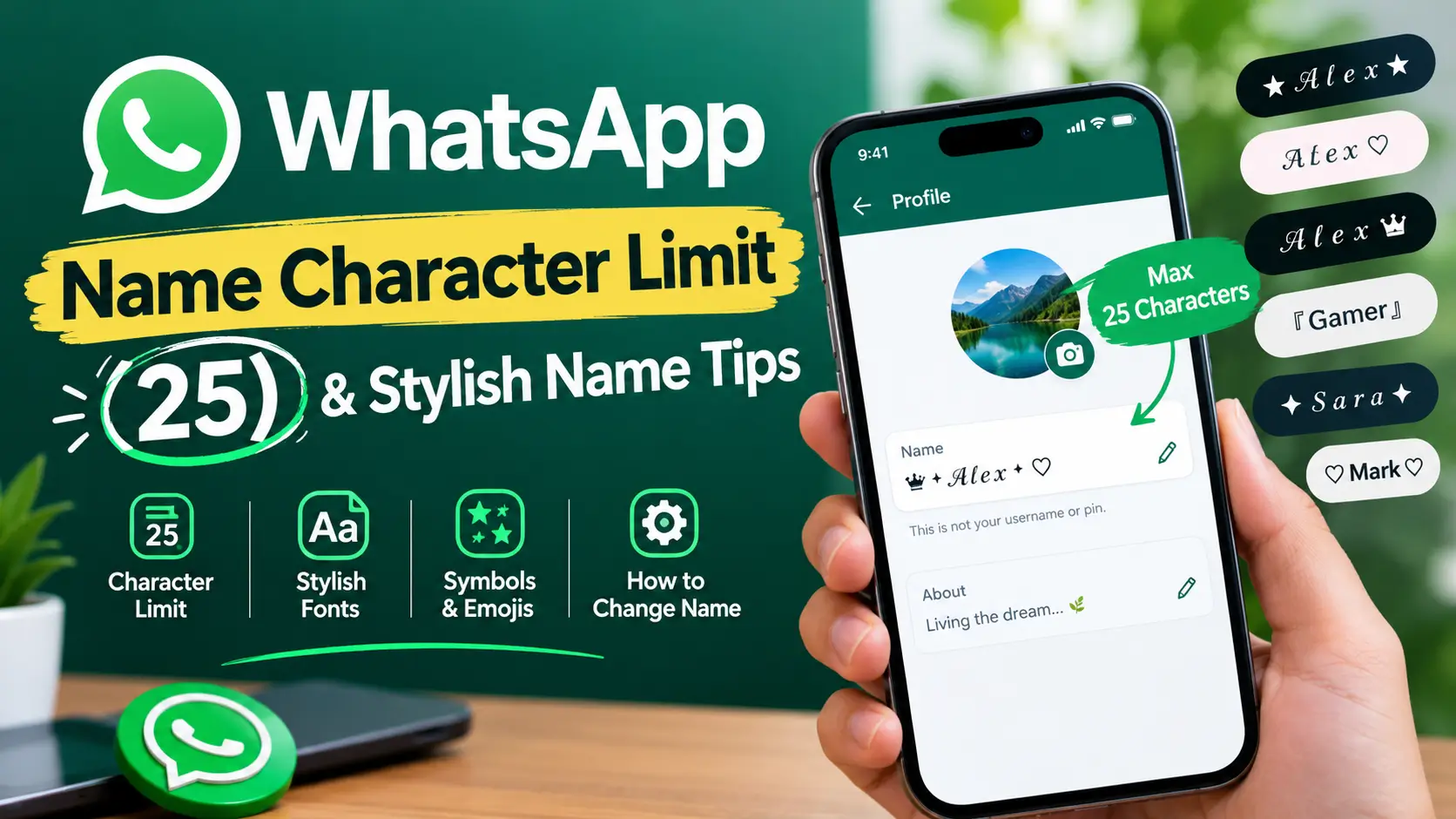
The WhatsApp profile name limit is 25 characters. If you want to use a nickname, decorative symbols, or stylish Unicode letters, keep your name short enough to fit within the limit.
For example, Alex Gamer contains 10 visible characters, including the space. A decorative name such as ★ Alex ★ contains 8 visible characters.
One important distinction: the number of characters you see on screen may not always match the way software counts Unicode text. If you use fancy letters or complex emojis, paste your name into WhatsApp and check whether it is accepted before saving it.
WhatsApp Character Limits at a Glance
Different WhatsApp fields serve different purposes, so their limits should not be treated as interchangeable.
| WhatsApp field | What to know |
|---|---|
| Profile name | Up to 25 characters |
| About | A separate profile field with its own limit |
| Group name | Separate from your personal profile name |
| Group description | Has its own limit |
| Text status | Separate from your profile name |
| Chat message | Subject to message-length restrictions |
The 25-character limit refers to the personal profile name, not every field in WhatsApp. Exact limits for other fields can change or depend on the version and interface, so verify them in the current app before publishing a specific number.
For official profile instructions, visit the WhatsApp Help Center.
How Does WhatsApp Count Characters?
Counting visible characters is easy for ordinary text, but decorative Unicode text can be more complicated.
Letters, Numbers and Spaces
Ordinary letters, digits, and spaces are straightforward to count.
Alex— 4 charactersAlex123— 7 charactersAlex Gamer— 10 charactersSara Khan— 9 characters
Spaces count as part of your name. If you want to add a word or symbol, leave enough room for it.
Symbols and Decorative Characters
Common symbols can make your profile name look distinctive without adding much visual clutter.
Examples include:
Alex ★♡ Sara亗 Alex『Mark』Zara ✿
The visible counts for these examples are 6, 6, 6, 6, and 6 respectively, counting each displayed symbol as one visible character.
Emojis
Emojis can make names more expressive, but not all emojis are represented internally in the same way.
For example, a simple smile emoji may be represented differently from a family emoji composed of several joined characters. This means visible length and internal Unicode representation are not always identical.
Best practice: use one or two simple symbols or emojis and test the final name in WhatsApp.
Stylish Unicode Letters
Stylish names often use Unicode characters that resemble bold, cursive, gothic, or small-cap letters.
Examples:
- Normal: Alex
- Bold: 𝐀𝐥𝐞𝐱
- Cursive: 𝓐𝓵𝓮𝔁
- Fraktur: 𝔄𝔩𝔢𝔵
- Small caps: ᴀʟᴇx
These are special text characters, not ordinary letters displayed in a different font. Their appearance and counting behavior can vary across software and devices.
A useful rule is to keep decorative names short rather than assuming that every visible letter will count identically.
Stylish WhatsApp Name Examples
Looking for a name that is easy to copy and use? Try these examples and choose a style that matches your personality.
| Style | Copy-ready example | Visible characters |
|---|---|---|
| Simple | Alex | 4 |
| With a space | Alex Gamer | 10 |
| Bold | 𝐀𝐥𝐞𝐱 | 4 |
| Cursive | 𝓐𝓵𝓮𝔁 | 4 |
| Fraktur | 𝔄𝔩𝔢𝔵 | 4 |
| Small caps | ᴀʟᴇx | 4 |
| Stars | ★ Alex ★ | 8 |
| Brackets | 『Alex』 | 6 |
| Ornate | ꧁Alex꧂ | 6 |
| Heart | Alex ♡ | 6 |
Counts show visible characters, not a guarantee of how WhatsApp internally counts or accepts every Unicode sequence.
Simple and Clean WhatsApp Names
Simple names are easy to read and suitable for everyday conversations.
- Sara K.
- Alex ✦
- Ayesha ♡
- Mark Ali
- Zara ✿
Aesthetic WhatsApp Names
If you prefer a softer or more decorative look, try these options.
- 𝓢𝓪𝓻𝓪 ♡
- ᴀʟᴇx ✦
- ✿ Zara ✿
- 𝓐𝓵𝓲 ♡
- Moon ☾
Gaming WhatsApp Names
These styles can suit gaming friends, clans, and gaming communities.
- 亗 Alex
- 『Gamer』
- Alex ⚡
- ꧁Ali꧂
- 乂 Shadow
Cute WhatsApp Names
Cute names often work best with one recognizable symbol.
- Bunny ✿
- Sara 🌸
- Baby ♡
- Angel ✨
- Kitty ♡
Professional WhatsApp Names
For business conversations, customer support, or work groups, readability matters more than decoration.
Examples:
- Alex Khan
- Sara Designer
- Alex | Design
- Zara Studio
- Mark Web
Use a name that customers can recognize easily. Avoid excessive symbols that make your identity harder to read.
How to Make a Stylish WhatsApp Name
WhatsApp does not offer a full decorative-font menu for profile names. You can instead copy Unicode text from a stylish name generator.
Follow these steps:
- Open a stylish name generator.
- Enter your name or nickname.
- Browse bold, cursive, gothic, and decorative styles.
- Copy the actual text rather than a screenshot.
- Open WhatsApp and go to your profile.
- Paste the name into the profile name field.
- Save it and check that the result displays correctly.
Choose a generator that provides copy-ready text. You should not need to install a special font simply to paste Unicode characters.
If a style appears as empty boxes or is rejected, try ordinary letters or a simpler decorative design.
How to Change Your WhatsApp Profile Name
You can change your profile name through WhatsApp’s settings. Menu labels may differ slightly depending on your device and app version.
On Android
- Open WhatsApp.
- Tap the three-dot menu.
- Select Settings.
- Tap your profile photo or name.
- Select the edit icon beside your name.
- Enter your new name.
- Save your changes.
On iPhone
- Open WhatsApp.
- Open the Settings or profile area shown in your version.
- Tap your profile.
- Select your name.
- Enter the new name and save it.
On WhatsApp Web or Desktop
- Open WhatsApp Web or the desktop app.
- Click your profile photo.
- Open your profile details.
- Select the edit icon beside your name.
- Update and save the name.
If the edit option is missing, check that WhatsApp is updated and follow the instructions for your current version in the official Help Center.
Who Can See Your WhatsApp Profile Name?
Your profile name and the contact name stored by another person are not necessarily the same.
If someone has saved your phone number in their address book, they may see the name they assigned to your contact. Your WhatsApp profile name is particularly useful to people who have not saved your number, including people who encounter you in group conversations.
This is why a recognizable name is often more practical than a long string of decorative characters.
WhatsApp Profile Name vs Username
WhatsApp is introducing optional usernames as a separate way to identify and contact people. According to WhatsApp’s official information, usernames are rolling out gradually, so the feature may not be available to every account yet.
The two fields serve different purposes:
| Feature | Profile name | Username |
|---|---|---|
| Main purpose | Display name | Unique identifier |
| Must be unique? | No | Yes |
| Main use | Identifying your profile | Finding or contacting you |
| Phone number privacy | Does not replace your number | Designed to help you connect without initially sharing your number |
WhatsApp announced username reservations on June 29, 2026, ahead of a broader rollout. Availability may vary by account and region.
Check the official WhatsApp username information for the current rollout status and rules.
Remember that a profile name is not the same thing as a username. Do not apply the 25-character profile-name limit to usernames without checking the relevant username requirements.
Downsides of Using Fancy WhatsApp Names
Decorative names can look attractive, but they have some practical disadvantages.
Accessibility
Screen readers may pronounce decorative Unicode characters differently from ordinary letters. A heavily stylized name can be difficult for some users to understand.
Searchability
People who type a plain name may have difficulty matching it with an unusual decorative version. A recognizable name is easier to communicate and remember.
Device Compatibility
Older devices or unsupported fonts may display empty boxes or unexpected characters.
Professional Appearance
A highly decorated name may not suit a work account or business conversation. A plain name with one small symbol is often a better compromise.
For example, Alex ✦ is easier to read than a name filled with repeated symbols.
Common WhatsApp Name Problems and Fixes
| Problem | What to try |
|---|---|
| Name exceeds the limit | Shorten the name and remove unnecessary symbols. |
| Stylish letters appear as boxes | Use ordinary letters or a more widely supported style. |
| Pasted name is rejected | Try a shorter name and remove complex characters. |
| Name looks different on another phone | Test a simpler Unicode style. |
| Friends see a different name | Check whether they have saved your number under another name. |
| Cannot find the edit option | Update WhatsApp and check the current profile settings. |
| Unsure whether an emoji fits | Paste the name into the app and check before saving. |
Try Our Name Tools
FAQs
What is the WhatsApp name character limit?
The personal WhatsApp profile name can contain up to 25 characters. Decorative text should be tested in the app because visible length and internal Unicode counting can differ.
Do spaces count in a WhatsApp name?
Yes. Spaces are part of your name. For example, Alex Gamer has 10 visible characters, including the space.
Do emojis count toward the WhatsApp name limit?
Emojis use space in the name field. Simple emojis and complex emoji sequences can have different internal representations, so test the finished name before saving it.
Can I use symbols such as ★ and ♡ in my WhatsApp name?
Common decorative symbols may work, but display and acceptance can vary. Use a simpler alternative if a particular character causes problems.
Why does my stylish WhatsApp name get rejected?
Possible reasons include exceeding the limit, unsupported characters, or a Unicode sequence that the app does not accept. Try shortening the name and removing complex symbols.
Can I use Urdu or Arabic in my WhatsApp name?
You can try Urdu, Arabic, and other supported scripts. The display and exact counting behavior may vary, so check the name in your app.
Does changing my profile name change my saved contact name?
No. Changing your profile name does not automatically change the contact name someone has saved in their phone.
Is a WhatsApp username the same as a profile name?
No. A profile name is your display name, while a username is a separate, unique identifier. Username availability and setup depend on WhatsApp’s current rollout.
Can I use stylish text without installing a font?
Yes. You can copy Unicode text from a generator and paste it into WhatsApp. Installing a font is generally unnecessary for using copy-ready Unicode characters.
Conclusion
The WhatsApp profile name limit is 25 characters, giving you room for your name, a nickname, or a short decorative style. Spaces and symbols contribute to the visible length, while complex Unicode characters can behave differently from ordinary text.
For the best result, choose a readable name, use decorative symbols sparingly, and test the finished text in WhatsApp before saving it. If you want to use a username as well, remember that it is a separate feature with its own rules and availability.
A short, recognizable name is usually the most practical choice for everyday chats, groups, and business conversations.