TikTok Username Rules: Length, Symbols, Name Changes & Fixes
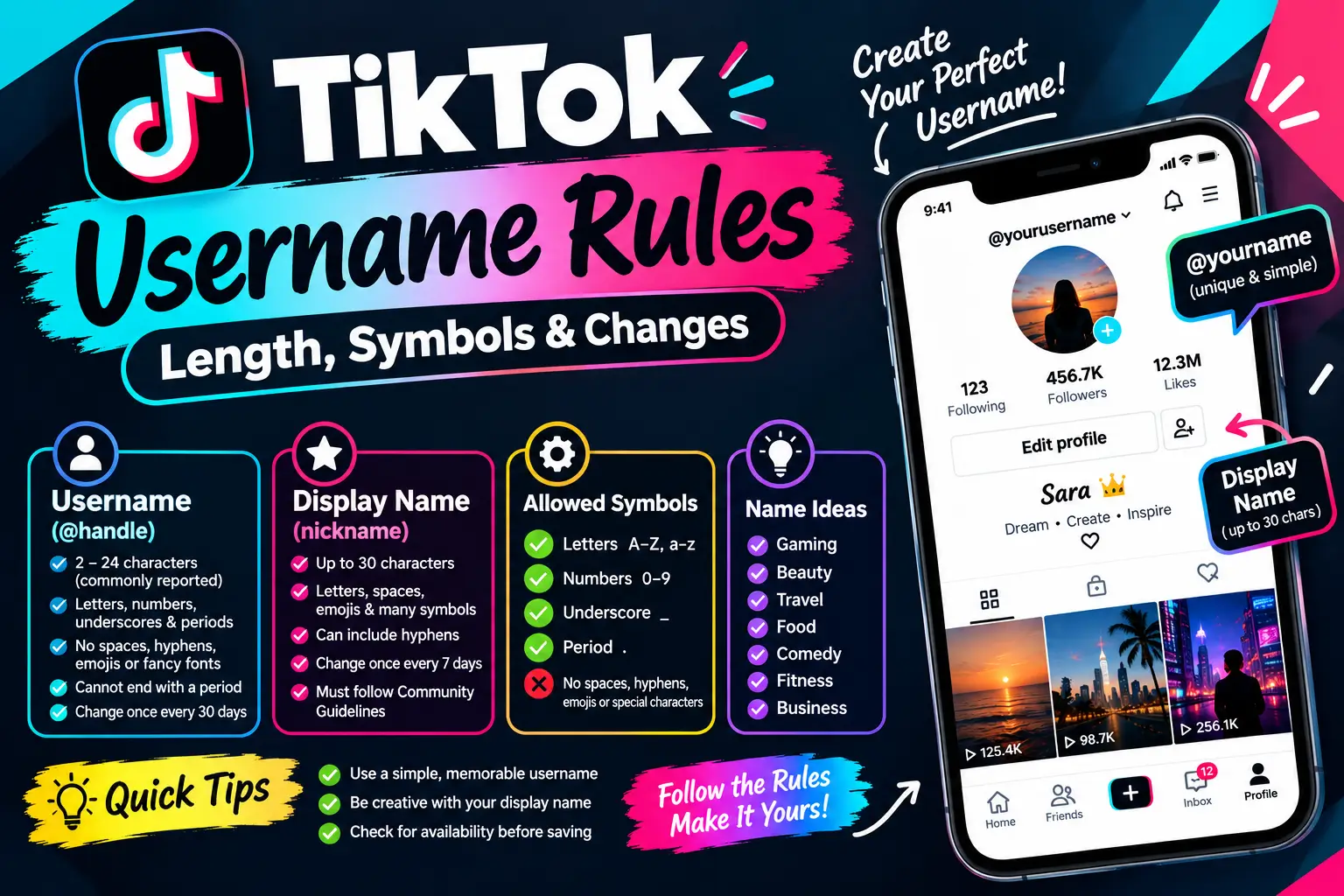
TikTok usernames are unique account handles that begin with @. They can contain letters, numbers, underscores (_), and periods (.), but cannot end with a period. TikTok says usernames can be changed once every 30 days, and changing one also changes your profile link.
Your display name, which TikTok calls your nickname, is different. It can contain up to 30 characters and can be changed once every seven days. You can use the display-name field to try compatible decorative text, emojis, or symbols, although not every character is guaranteed to work on every device.
TikTok Username vs. Display Name: What’s the Difference?
TikTok gives your account two separate names. Understanding the difference helps you choose a name that looks good and remains easy to find.
| Feature | Username (@handle) | Display name (nickname) |
|---|---|---|
| Purpose | Identifies your account | Shows your chosen name across TikTok |
| Must be unique? | Yes | No |
| Character limit | 2–24 characters is commonly reported; verify in the app | Up to 30 characters |
| Spaces | Not allowed | Can be used |
| Emojis and decorative text | Not supported in the standard username format | Some may work |
| Change frequency | Once every 30 days | Once every 7 days |
| Changes your profile URL? | Yes | No |
TikTok’s official help pages confirm the permitted username characters and the change intervals. The 2–24-character username range is also documented by reputable secondary references; if the app gives you a different limit, follow the validation message shown on your account.
What Is a TikTok Display Name?
Your display name is the name people see on your profile and in places such as comments. Unlike usernames, display names do not need to be unique.
Examples:
- Sara Khan
- Gaming Queen
- 𝓢𝓪𝓻𝓪
- ♡ Sara ♡
- Shadow Play
A display name can help communicate your personality, niche, or brand. Keep it recognizable, especially if people need to identify your account quickly.
What Is a TikTok Username?
Your username is your unique @handle. People can use it to find, mention, or visit your account.
Examples:
@sara.vlogs@alikhan_07@mini_vlogs@shadow.plays
Your username also forms part of your TikTok profile link. Choose it carefully because changing it affects the URL you have shared elsewhere.
TikTok Username Rules: Length and Allowed Characters
TikTok usernames have stricter formatting requirements than display names. Use these rules when creating a new handle.
Characters You Can Use
TikTok’s official guidance permits:
- Letters:
sara,gaming - Numbers:
sara07,gamer2026 - Underscores:
sara_vlogs - Periods:
sara.vlogs
A period cannot be placed at the end of your username.
TikTok Username Examples: Valid vs. Invalid
| Username | Result | Reason |
|---|---|---|
sara.vlogs | Valid format | Letters and a period |
ali_khan07 | Valid format | Letters, numbers, and underscore |
pro.gamer | Valid format | Permitted characters |
sara vlogs | Invalid | Contains a space |
sara-vlogs | Invalid | Contains a hyphen |
sara.vlogs. | Invalid | Ends with a period |
sara♡ | Invalid | Contains an unsupported symbol |
𝓼𝓪𝓻𝓪 | Invalid | Uses decorative Unicode letters |
These examples illustrate character-format rules. A correctly formatted username may still be unavailable because another account uses it or TikTok restricts it.
How Many Characters Can a TikTok Username Have?
TikTok usernames are commonly reported as having a minimum of 2 and a maximum of 24 characters. Because TikTok’s public username-change page does not clearly display that range in every version, check the current app if you need to confirm a specific length.
For a memorable handle, use a short name that is easy to spell and type. Avoid adding random numbers just to make a username longer.
Can You Use Spaces, Hyphens, or Periods?
You cannot use spaces or hyphens in a standard TikTok username. Use a period or underscore to separate words instead.
For example:
- Instead of
sara vlogs, trysara.vlogs. - Instead of
sara-vlogs, trysara_vlogs. - Do not finish a username with a period.
Remember that a username must also be available before TikTok will let you save it.
Can You Use Emojis or Fancy Fonts in a TikTok Username?
No. TikTok’s standard username format does not support emojis, hearts, or decorative Unicode letters. A username such as @sara♡ or @𝓼𝓪𝓻𝓪 will not follow the permitted character rules.
You can try compatible decorative characters in your display name instead.
For example:
| Style | Display-name example |
|---|---|
| Simple | Sara Khan |
| Script | 𝓢𝓪𝓻𝓪 |
| Bold | 𝐒𝐚𝐫𝐚 |
| Cute | ♡ Sara ♡ |
| Gaming | 亗 Shadow Play 亗 |
| Minimal | sara. |
These are examples to test, not a guarantee that TikTok will accept every character. Some characters may render differently across devices or assistive technologies.
TikTok Display Name Rules
TikTok calls the display name your nickname. Its official Help Center states that a nickname can contain up to 30 characters and can be changed once every seven days.
Your display name must comply with TikTok’s Community Guidelines. Avoid names that impersonate another person, mislead users, or violate platform rules.
Tips for Choosing a Display Name
- Make the name easy to read on a phone screen.
- Use your name, brand, or niche so people recognize you.
- Add decorative symbols sparingly.
- Preview the name before saving.
- Remember that changing the display name again may require waiting seven days.
TikTok Name Ideas by Niche
Use these ideas as starting points, then adapt them to your own identity.
| Niche | Display name idea | Username idea |
|---|---|---|
| Gaming | 亗 Shadow Play 亗 | shadow.plays |
| Beauty | 𝓢𝓪𝓻𝓪 𝓛𝓸𝓸𝓴𝓼 | sara.glow |
| Travel | Travel Diaries | sara.travels |
| Food | Ali Eats 🍜 | alieats_daily |
| Comedy | Mini Vlogs | mini_vlogs |
| Fitness | Fit with Ali | fitwithali |
| Business | Sara Creates | sara.creates |
| Aesthetic | ♡ Sara ♡ | sara.aesthetic |
Username ideas may already be taken. Check availability in TikTok before using one, and choose an alternative if necessary.
How Often Can You Change Your TikTok Username?
TikTok has separate change limits for usernames and display names.
Username: Once Every 30 Days
TikTok’s official Help Center says you can change your username once every 30 days.
Before changing it, remember:
- Your TikTok profile link changes with your username.
- You should update external links that use the old profile URL.
- Your old username may not be available for reuse immediately.
- You should check the spelling and availability before saving.
Display Name: Once Every 7 Days
TikTok allows you to change your nickname or display name once every seven days. Even if you only want to replace plain text with a fancy version, the change still counts.
If you are experimenting with decorative text, prepare and preview your preferred version first.
How to Change Your TikTok Username
Follow these steps in the TikTok app:
- Open TikTok and tap Profile.
- Tap Edit profile.
- Select Username.
- Enter your new username.
- Check the spelling and permitted characters.
- Tap Save if the username is accepted.
If TikTok says the username is unavailable or invalid, try another version. If you have changed your username recently, you may need to wait until the 30-day restriction expires.
Menu labels may vary slightly between app versions.
How to Change Your TikTok Display Name
To change the name displayed on your profile:
- Open TikTok and go to Profile.
- Tap Edit profile.
- Select Name.
- Enter your preferred display name.
- Review the text and characters.
- Tap Save.
Your nickname can contain up to 30 characters, subject to TikTok’s rules. If the name contains fancy Unicode characters, check that they display correctly before relying on them.
How to Make a Stylish TikTok Display Name
A fancy-text generator lets you explore different ways to style a name before adding it to your profile.
- Open a TikTok name generator.
- Enter your name or nickname.
- Explore styles such as bold, script, aesthetic, or decorative text.
- Copy a version that is easy to read.
- Open TikTok and go to Profile → Edit profile → Name.
- Paste the text and save it if TikTok accepts it.
What to Know Before Using Fancy Fonts
Fancy text is usually made from Unicode characters rather than a font installed on your phone. This creates a few limitations:
- Accessibility: Screen readers may interpret decorative characters differently from ordinary text.
- Searchability: People may struggle to find your profile if your name uses only unusual characters.
- Display problems: Unsupported characters can appear as blank boxes or different symbols.
- Username restrictions: Decorative letters do not follow TikTok’s standard username character rules.
A practical approach is to keep your username simple and searchable while adding a little styling to your display name.
Why Is My TikTok Username Not Working?
If TikTok will not accept your chosen username, check these common causes.
1. The Username Is Already Taken
TikTok usernames must be unique. If someone else uses your preferred handle, try adding a relevant word, your initials, or a short number.
For example, if sara.vlogs is unavailable, you could test sara.daily or sara_vlogs07, provided the alternatives are available.
2. It Contains Unsupported Characters
Remove spaces, hyphens, emojis, hearts, and decorative letters. Use letters, numbers, underscores, and periods, without a period at the end.
3. The Username Is Too Long or Too Short
Try a shorter variation if TikTok reports a character-limit error. The commonly reported username range is 2–24 characters, but the app’s current validation should be treated as the final check.
4. You Changed Your Username Recently
TikTok limits username changes to once every 30 days. If the waiting period has not ended, you will generally need to wait before changing it again.
5. Your Old Username Is Unavailable
TikTok may temporarily prevent a released username from being added to an account. Try another variation instead of repeatedly submitting the same handle.
6. Your Display Name Will Not Save
The display name may exceed 30 characters, contain unsupported text, or be blocked by the seven-day change restriction. Simplify the name and follow the message shown by TikTok.
Tips for Choosing the Best TikTok Name
A good TikTok name should be distinctive, memorable, and easy to recognize.
- Keep your username simple. People should be able to type it after hearing it once.
- Match your niche. A relevant word can help visitors understand your content.
- Use a consistent handle. If possible, use a similar username on your other social platforms.
- Avoid copying other creators. Choose a name that represents your own identity.
- Check spelling before saving. Username changes are restricted to once every 30 days.
- Plan for the future. Choose a name that will still fit if your content or brand grows.
For a display name, use decorative text only when it improves the appearance without making your identity difficult to read.
Try Our Name Tools
FAQs
How many characters can a TikTok username have?
TikTok usernames are commonly reported as 2–24 characters. Check the username field in your current app if you need to confirm a particular limit.
How many characters can a TikTok display name have?
TikTok’s official Help Center states that a nickname or display name can contain up to 30 characters.
What symbols can I use in a TikTok username?
TikTok allows letters, numbers, underscores, and periods in usernames. A username cannot end with a period.
Can I use spaces or hyphens in a TikTok username?
No. Standard TikTok usernames cannot contain spaces or hyphens. Try a period or underscore to separate words.
Can I use emojis in my TikTok username?
No. Emojis are not supported in the standard username format. You can try compatible emojis in your display name instead.
Can I use fancy fonts in my TikTok name?
You can try Unicode decorative text in your display name, but not all characters will be accepted or display consistently. Fancy letters do not follow the standard username rules.
How often can I change my TikTok username?
TikTok’s official Help Center says you can change your username once every 30 days. Changing it also changes your profile link.
How often can I change my TikTok display name?
TikTok allows you to change your nickname or display name once every seven days.
Does changing my TikTok username affect my followers?
Changing your username changes your profile link. Your account remains the same, but you should update any external links that point to the old URL.
Can two TikTok accounts have the same display name?
Yes. Display names do not have to be unique, but usernames do.
Why can’t I use the TikTok username I want?
It may already be taken, contain unsupported characters, violate TikTok’s rules, or be unavailable after a recent change. Try a different username that follows the permitted character format.
Can I change my TikTok username before the waiting period ends?
TikTok’s standard rule is one username change every 30 days. If the restriction is active, follow the waiting-period message shown in your app.
Conclusion
TikTok usernames and display names serve different purposes. Your username should follow the permitted character rules, be easy to remember, and remain searchable. Your display name gives you more flexibility to show your personality through words, symbols, or compatible decorative text.
Before saving a new name, check its spelling, preview its appearance, and remember TikTok’s username and display-name change intervals. A simple username paired with a readable, stylish display name is a practical way to create a recognizable TikTok profile.
Official TikTok References
- Changing your username: https://support.tiktok.com/en/getting-started/setting-up-your-profile/changing-your-username
- Changing your nickname: https://support.tiktok.com/en/getting-started/setting-up-your-profile/changing-your-nickname
- Community Guidelines: https://www.tiktok.com/community-guidelines/en/integrity-authenticity/