Roblox Display Name vs Username: Rules & Limits
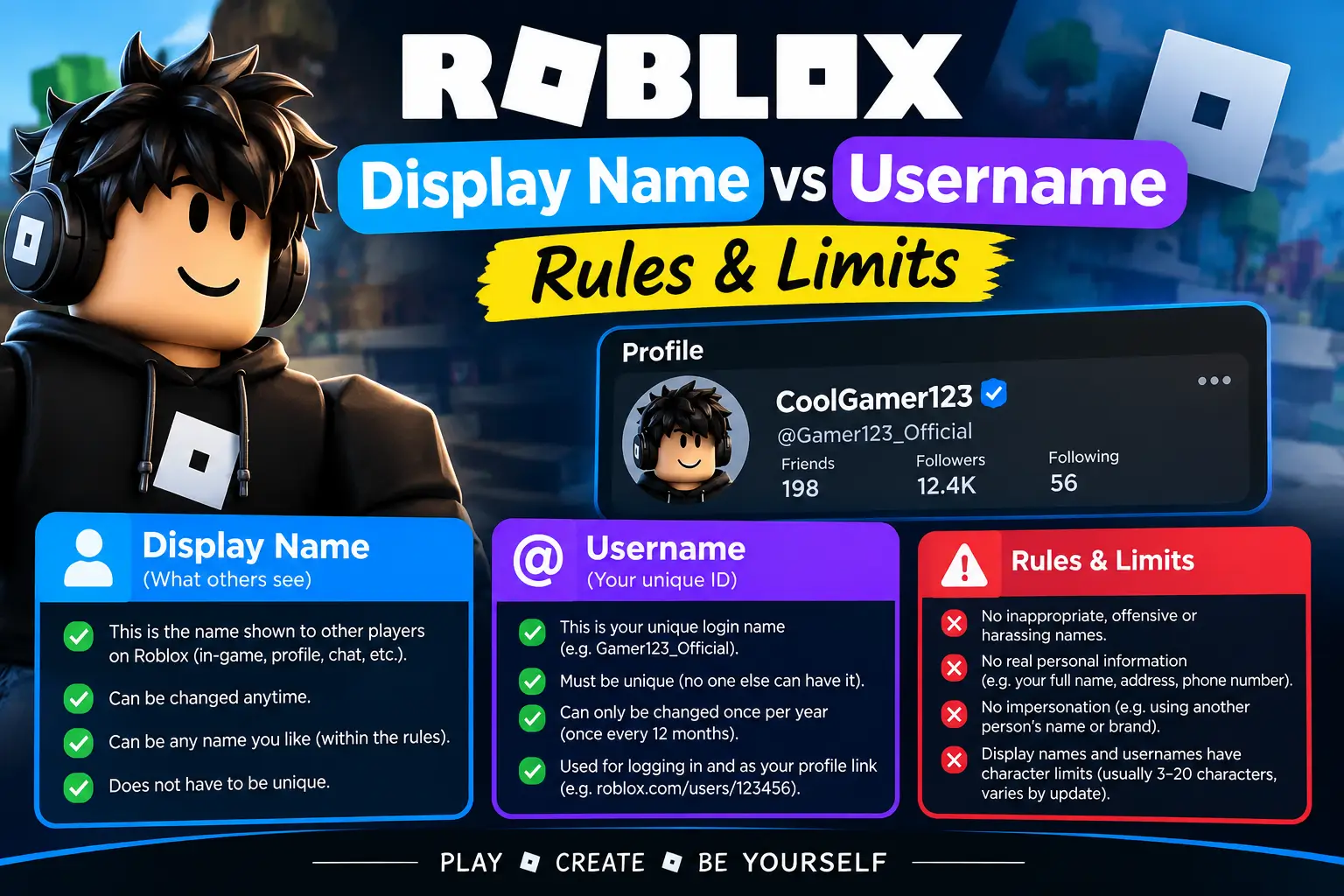
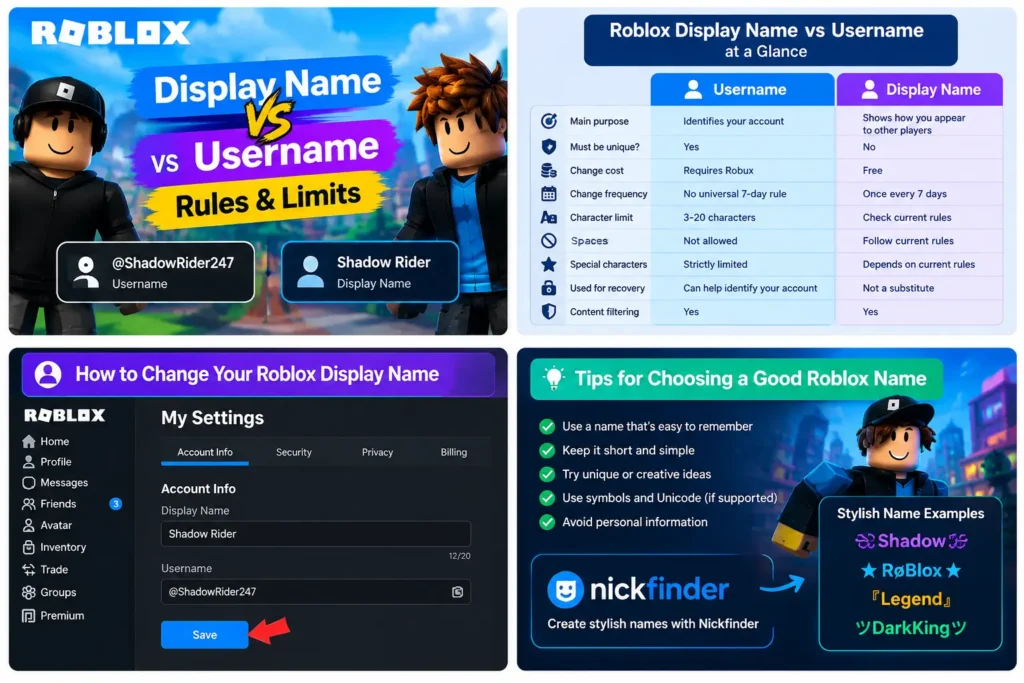
A Roblox username and a display name serve different purposes. Your username is your unique account identifier, while your display name is the name shown to other players across your profile and supported game experiences. You can change your display name for free, but changing your username requires Robux.
Understanding the difference helps you choose the right name, avoid unnecessary costs, and fix problems when Roblox rejects a name. Here is how both names work, including their rules, character limits, and change restrictions.
Roblox Display Name vs Username at a Glance
| Feature | Username | Display Name |
|---|---|---|
| Main purpose | Identifies your account | Shows how you appear to other players |
| Must be unique? | Yes | No |
| Change cost | Requires Robux | Free |
| Change frequency | No universal 7-day rule should be assumed; check the current account settings | Once every 7 days |
| Character limit | 3–20 characters | Check the current Display Name field and official rules |
| Spaces | Not allowed | Follow the current display-name rules |
| Special characters | Strictly limited | Support depends on the current rules and filters |
| Used for account recovery | Can help identify your account | Not a substitute for your username |
| Content filtering | Yes | Yes |
Roblox’s official help pages explain the difference between these names and the username-change process. Username requirements should not be confused with display-name requirements.
Official references: Changing Your Username and Changing Your Display Name.
What Is a Roblox Username?
Your Roblox username is the unique name associated with your account. It helps other users identify the correct account and is used when signing in with your username and password.
For example:
- Username:
ShadowRider247 - Display name:
Shadow Rider
The username is unique, so another account cannot use the same active username. If your preferred username is unavailable, you must choose a different one.
Your username can also appear on your profile alongside your display name. Roblox may show it with an @ symbol.
Roblox Username Rules
Keep these rules in mind when creating or changing your username:
- Unique: The username must be available for your account.
- Length: Roblox username requirements specify a minimum of 3 and a maximum of 20 characters.
- Allowed characters: Usernames use letters and numbers, with limited underscore support.
- Underscores: An underscore cannot appear at the beginning or end of the username, and username rules limit how many you can use.
- No spaces: Spaces are not permitted in usernames.
- Content restrictions: The username must comply with Roblox’s Community Standards and filtering rules.
- Personal information: Avoid including private details such as your phone number or home address.
If a username is already taken, try a different spelling or add a number. Do not add personal information simply to make a name unique.
For the official requirements, see Roblox’s username guidance.
What Is a Roblox Display Name?
A display name is the name you choose to present yourself to other players. It can appear on your profile and in supported experiences, including places where Roblox displays player names in the game interface.
Unlike usernames, display names do not have to be unique. Several players can use the same display name, so Roblox still uses usernames to distinguish accounts.
For example, multiple players may choose Shadow, but each account must have its own unique username.
Roblox Display Name Rules
Before choosing a display name, remember these important points:
- Free to change: Roblox allows display-name changes without a Robux fee.
- Seven-day restriction: You can generally change your display name once every 7 days.
- Duplicates allowed: Your display name does not need to be unique.
- Content filtering: Your name must follow Roblox’s Community Standards.
- Character support: Do not assume every symbol, emoji, or decorative Unicode character will be accepted.
- Length restrictions: Check the current name-entry field and Roblox Help Center for the applicable limit.
Roblox may reset a display name that violates its rules. Choose an appropriate name and review it before saving.
How Many Characters Can a Roblox Name Have?
The character limits depend on which type of name you are changing.
Username character limit
A Roblox username must contain 3 to 20 characters. It must also follow the platform’s restrictions on letters, numbers, underscores, and inappropriate content.
Examples of usernames that follow the basic format include:
PixelRider7NovaPlayer22Shadow_Gamer
These examples illustrate the basic format; availability is not guaranteed.
Display name character limit
Display names follow their own rules, so do not automatically apply the username’s 3–20 character range to them.
Check the current Display Name field in Account Settings and consult Roblox’s official help documentation if your chosen name is rejected. The accepted length and character support may differ from username requirements.
Can Two Roblox Players Have the Same Name?
Two players can share the same display name, but they cannot share the same active username.
For example, two players could both display Luna, while their usernames might be LunaPlays82 and LunaGamer51.
This distinction is useful when searching for friends. If several accounts have similar display names, check the username on the profile to find the correct person.
Does Changing a Roblox Name Cost Robux?
The cost depends on the name you want to change.
| Action | Cost |
|---|---|
| Change your display name | Free |
| Change your username | Requires Robux |
| Change your username back to an older one | Requires Robux |
The exact username-change price should be checked in your account settings before confirming the purchase. Do not rely on an older guide that lists a fixed price without verifying that it is still current.
Roblox will show the applicable purchase price during the username-change process. Make sure you have enough Robux and review the new username carefully before buying.
How to Change Your Roblox Display Name
Follow these steps to update your display name:
- Sign in to your Roblox account.
- Open Settings.
- Select Account Info.
- Find the Display Name field and select its edit icon.
- Enter your preferred display name.
- Review the name and select Save.
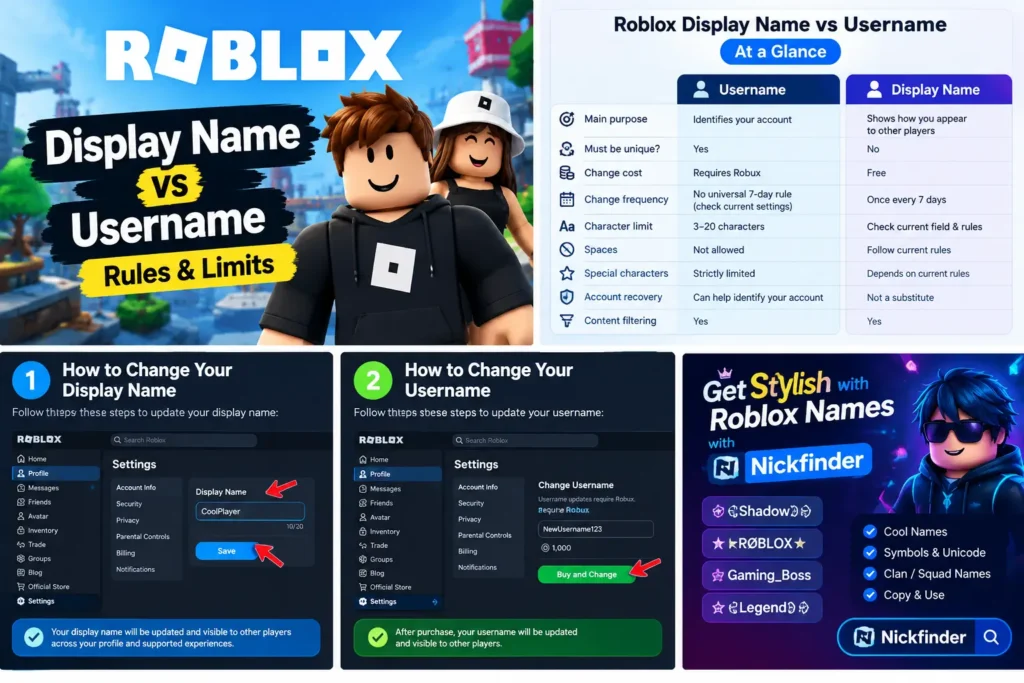
Your new display name should appear after the change is accepted. If you changed it recently, you may need to wait until the seven-day restriction has passed before changing it again.
You can access Roblox through the official website.
How to Change Your Roblox Username
Changing a username requires a Robux purchase. Follow these steps:
- Sign in to the correct Roblox account.
- Open Settings.
- Select Account Info.
- Find the Username field and select its edit icon.
- Enter the new username.
- Enter your current Roblox password when prompted.
- Review the price and confirm the purchase.
Your new username must be available and follow Roblox’s naming requirements.
Before you confirm: Check the spelling, make sure the username is correct, and review the price displayed on the purchase screen.
Can You Return to an Old Username?
Roblox allows users to view previous usernames in supported account and profile areas, and you may be able to switch back to a previous username through the normal change process. Changing back still requires Robux.
A previous username may also have restrictions on availability, so do not assume every old name can be reused under all circumstances.
Which Should You Change: Display Name or Username?
The right choice depends on what you want to accomplish.
Change your display name if:
- You want a fresh look without spending Robux.
- You want other players to see a different name.
- You want a stylish or memorable name for your profile.
- You do not need to change your unique account identifier.
Change your username if:
- You want a different unique account name.
- Your existing username contains information you no longer want to use.
- You want to update the username associated with your profile and account identification.
- You are prepared to pay the displayed Robux fee.
If you only want to look different in games, changing your display name is usually the simplest option.
Why Can’t I Change My Roblox Name?
If Roblox will not accept your new name, use the following table to identify the likely problem.
| Problem | What to do |
|---|---|
| Username is already taken | Try another spelling or a different combination of letters and numbers. |
| Username is too short | Use at least 3 characters. |
| Username is too long | Keep it within the 20-character maximum. |
| Username contains unsupported symbols | Remove spaces and unsupported characters; follow the underscore rules. |
| Display name will not save | Review the name for prohibited content and check the current length restrictions. |
| Display name cannot be changed again | Check whether the seven-day waiting period has ended. |
| Not enough Robux | Check the price displayed by Roblox and your available balance. |
| Username change fails | Confirm your password and make sure the new username is available. |
| Name is reset or rejected | Choose a different name that complies with Roblox’s Community Standards. |
If the issue continues, consult the official Roblox Support Center rather than giving your password to someone offering to change your name.
Tips for Choosing a Good Roblox Name
A good Roblox name should be easy to remember, appropriate, and suitable for the games you play.
- Keep it simple: Short, readable names are easier for friends to recognize.
- Avoid private details: Do not include your full name, phone number, address, or other sensitive information.
- Check spelling: Make sure the name looks right before saving it.
- Use symbols carefully: Some decorative characters may not work across Roblox experiences.
- Choose a name you like: Remember that username changes require Robux, while display names have a waiting period between changes.
If you want ideas for a gaming identity, you can explore the Nickfinder name generator for inspiration. Before using any generated name, check that Roblox accepts its characters and that it follows the platform’s rules.
Try Our Name Tools
FAQs
What is the difference between a Roblox display name and a username?
A username is your unique account identifier. A display name is the name shown to other players in supported parts of Roblox. Multiple players can share a display name, but usernames must be unique.
Is a Roblox display name free to change?
Yes. Roblox allows you to change your display name without paying Robux, subject to its current restrictions.
How often can I change my Roblox display name?
You can generally change your display name once every 7 days. If the option is unavailable, check when you last changed it.
How many characters can a Roblox username have?
A Roblox username must contain 3–20 characters and follow the platform’s character restrictions.
Can two Roblox players have the same username?
No. Usernames must be unique. Display names, however, can be shared by multiple players.
Does changing a Roblox username cost Robux?
Yes. Roblox requires Robux to change your username. Check the price shown in Account Settings because older guides may contain outdated amounts.
Can I use special symbols in my Roblox username?
Username characters are restricted. Letters and numbers are supported, and limited underscore use is allowed under Roblox’s rules. Spaces and many decorative symbols are not permitted.
Can I change my display name back to my username?
You can generally set a display name that matches your username if it meets the current display-name rules. You do not need to change the username itself to make the two names match.
Will changing my display name delete my Roblox progress?
Changing your display name is a naming change, not an account reset. It does not, by itself, delete your account or game progress.
Where can I find my Roblox username?
Open your Roblox profile and look for the username displayed with the @ symbol, usually beneath the display name.
Conclusion
The main difference between a Roblox display name and a username is uniqueness and cost. Your username uniquely identifies your account and costs Robux to change, while your display name is free to change and can be shared by multiple players.
If you want a new look, start with your display name. If you need a different unique account name, review the username rules and the displayed Robux price before confirming the change. Always choose an appropriate name and check the current Roblox requirements before saving it.