How to Change Name in BGMI & PUBG Mobile (Rename Card)
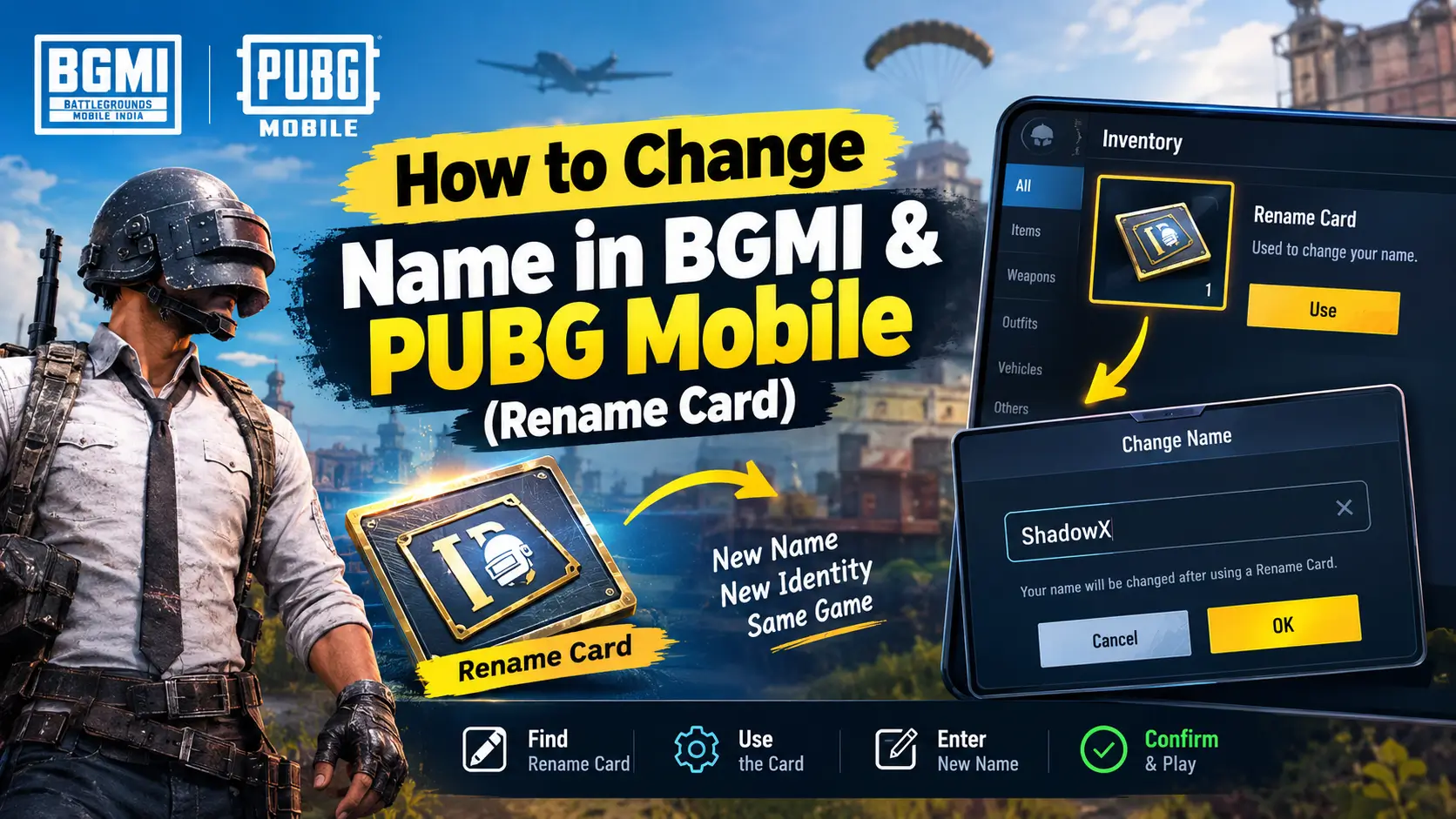
To change your name in BGMI or PUBG Mobile, you need a Rename Card. Open your Inventory, select the card, tap Use, enter your new name, and confirm the change. If you do not have a card, you may be able to get one through in-game missions or events, or purchase one from the game store.
This guide explains how to change your name in both games, where to get a Rename Card, what to check before confirming your new name, and how to fix common name-change errors.
Quick Steps to Change Your Name
Follow these steps to change your in-game name:
- Open BGMI or PUBG Mobile and enter the main lobby.
- Open your Inventory.
- Find the Rename Card.
- Select the card and tap Use.
- Enter the new name you want.
- Review the spelling and confirm by tapping OK.
Your new nickname should appear on your profile after the game accepts the change.
Important: You need an available Rename Card to change your existing character name. The card is consumed when you use it, so check your spelling before confirming.

How to Change Name in BGMI
Battlegrounds Mobile India (BGMI) allows players to change their in-game nickname using a Rename Card. Follow these steps.How to Change Name in BGMI
- Launch BGMI and open the main lobby.
- Tap Inventory.
- Look through your items for the Rename Card.
- Select the card and tap Use.
- Type your preferred nickname in the name-entry box.
- Check the name and tap OK to confirm.
If the name is accepted, your updated nickname will appear on your profile.
If you cannot find a Rename Card, check your inventory carefully and review the available missions, events, and store items.
How to Change Your Name in PUBG Mobile
The process in PUBG Mobile is similar, although some menu labels and item locations can differ from BGMI.
- Open PUBG Mobile and enter the main lobby.
- Locate and open your Inventory.
- Find your Rename Card.
- Select it and tap Use.
- Enter your new in-game nickname.
- Tap OK to confirm the change.
Make sure the name is spelled correctly and follows the game’s naming rules. If the game rejects your chosen nickname, try a different name or remove unsupported characters.
For the latest instructions, consult the official PUBG Mobile Help Center.
How to Get a Rename Card in BGMI and PUBG Mobile
If you do not have a Rename Card, check the following options. The available rewards and store locations can differ between the two games.

1. Get a Free Rename Card in BGMI
According to the official BGMI Help Center, players can obtain Rename Cards through eligible missions and events. Its published instructions mention the Level 3 and Level 10 Progress Missions as potential sources.
To check your options:
- Open BGMI.
- Review your Progress Missions and available rewards.
- Check current events for Rename Card rewards.
- Claim any eligible reward and look for the card in your inventory.
Not every event offers a Rename Card, and rewards can vary.
Official reference: How do I change my name? — BGMI Help Center.
2. Get a Free Rename Card in PUBG Mobile
The official PUBG Mobile Help Center states that players can receive their first free Rename Card by completing the Growth Mission at Level 10.
To check your reward:
- Open PUBG Mobile.
- Review your Growth Missions.
- Complete the eligible Level 10 mission if it is still available to you.
- Claim the reward and check your items.
You can also review current in-game events for additional opportunities.
Official reference: How do I change my in-game nickname? — PUBG Mobile Help Center.
3. Buy a Rename Card From the Store
If you have no free card available, check the in-game store.
In BGMI: Open the Shop and look under Treasures for the Rename Card.
In PUBG Mobile: Check the Shop and its Cards section. Menu labels may vary by version or region.
A Rename Card has commonly been listed for 180 UC, but do not assume this is the current price in every version. Check the price displayed in your own game before purchasing.
4. Check Your Inventory Before Buying
Before spending UC, make sure you do not already have an unused Rename Card.
If you recently completed a mission or claimed an event reward, check your items and in-game messages as well. This can help you avoid purchasing a card you do not need.
Rules to Know Before Changing Your Name
Before using a Rename Card, keep these points in mind.
- Daily limit: Official help instructions state that you can change your nickname only once per day using a Rename Card.
- Card required: You need an available card to change your existing nickname.
- Card consumption: The card disappears from your account after use.
- Name restrictions: Your chosen name must satisfy the game’s current naming rules.
- Special characters: Some symbols, decorative Unicode characters, and emojis may be rejected.
- Account progress: Renaming is intended to change your nickname, not reset your game progress.
- Separate games: BGMI and PUBG Mobile maintain separate game accounts and inventories. A card in one game should not be assumed to be available in the other.
For a smooth name change, decide on your preferred nickname before opening the confirmation screen.
How to Choose a Stylish BGMI or PUBG Mobile Name
Your gaming name can reflect your play style, squad, or personality. Before using your Rename Card, consider these ideas:
- Short names: Choose something easy for teammates to remember.
- Pro-style names: Use a clean, competitive-looking nickname.
- Clan names: Add a consistent prefix or suffix to match your squad.
- Stylish text: Try decorative lettering or symbols if the game supports them.
- Unique names: Make a small variation if your preferred nickname is unavailable.
You can use the Nickfinder name generator to create stylish nickname ideas, copy a design, and test it in BGMI or PUBG Mobile.
Remember that not every decorative character will work in the game. Keep a simple alternative ready in case the game rejects your first choice.
Why Can’t I Change My Name in BGMI or PUBG Mobile?
If you cannot change your nickname, identify the problem and try the relevant solution below.
| Problem | What to do |
|---|---|
| No Rename Card | Check eligible missions, events, and store items. |
| Card missing from Inventory | Review your items and claim any pending eligible rewards. |
| Name rejected | Try a different nickname that follows the game’s naming rules. |
| Unsupported symbols | Remove unusual characters, symbols, or emojis and test again. |
| Name is too long | Shorten the name to meet the game’s current character limit. |
| Daily limit reached | Wait until the next eligible rename period. |
| Rename option not working | Restart the game and check for updates or connection problems. |
| Card purchase unsuccessful | Check your UC balance and the transaction status before trying again. |
If the problem continues, contact the game’s official customer support and provide a screenshot of the error. Do not share your password or verification codes with anyone offering to fix the issue.
Can You Change Your Name Without a Rename Card?
Generally, you need a Rename Card to change your existing character’s nickname in BGMI or PUBG Mobile.
If you do not have one, check whether you can claim a mission reward, participate in an eligible event, or purchase a card from the in-game store. Available options depend on your account and game version.
Avoid websites or third-party services that promise free name changes in exchange for your login details. Use official in-game options to protect your account.
Try Our Name Tools
FAQs
1. How can I change my name in BGMI?
Open BGMI, go to Inventory, select your Rename Card, tap Use, enter your new name, and confirm. You must have an available Rename Card.
2. How can I change my name in PUBG Mobile?
Open PUBG Mobile, locate the Rename Card in your items, select Use, enter your preferred nickname, and confirm the change.
3. How can I get a free Rename Card in BGMI?
The official BGMI Help Center lists eligible Progress Missions, including Level 3 and Level 10 missions, along with events as possible sources. Check the rewards available to your account.
4. How can I get a free Rename Card in PUBG Mobile?
The official PUBG Mobile Help Center says players can receive their first free Rename Card by completing the Growth Mission at Level 10. Check your current missions for eligibility.
5. How much does a Rename Card cost?
A Rename Card has commonly cost 180 UC, but the current price may vary. Check the in-game store before purchasing.
6. How often can I change my name?
The official help instructions state that you can change your nickname once per day using a Rename Card. Check the game’s current rules if you encounter a restriction.
7. Can I use stylish symbols in my BGMI or PUBG Mobile name?
Some symbols and Unicode characters may work, while others can be rejected. Test your preferred name in the game before confirming it.
8. Will changing my name delete my rank or items?
Using a Rename Card changes your in-game nickname. It is not intended to reset your account progress, rank, or inventory.
9. Can I change my Character ID?
A Rename Card changes your nickname, not your numeric Character ID. Do not confuse the two.
10. Can I use the same nickname in BGMI and PUBG Mobile?
You can try using the same nickname in both games, but each game has its own account system and naming restrictions. Availability and acceptance are not guaranteed.
Conclusion
Changing your name in BGMI or PUBG Mobile is straightforward when you have a Rename Card. Open your Inventory, select the card, tap Use, enter your preferred nickname, and confirm the change.
If you need a card, check the relevant missions, events, and store options before spending UC. Choose your new name carefully, because the card is consumed when used and the daily rename limit applies.
For more nickname ideas, try Nickfinder and choose a stylish name that suits your gaming identity. Always test special characters in the game before confirming your final choice.